So you have a successful Slot Game called "Monster's Lab" that players really like. It has a great layout, striking characters, a reel frame that gels with the background seamlessly. Wouldn't it be great if you could replicate this success with a few more themes? Doing this manually could take you months. This is where modern AI tools shine!
In this post, we will show you how you can use Renderwolf's Slots Studio to effortlessly create and reskin new Slot Games using state-of-the-art AI tools.
Head over to Slots Studio, and pick a game that you’d like to clone. Maybe you previously created a game called Monster's Lab and are looking to reskin its cool layout into a new game called Caravan Riches. Or maybe you haven't made a game yet? No worries! Just pick the demo game that we set up for you! You can also add more elements in the demo game by clicking the 'Add Element' button.
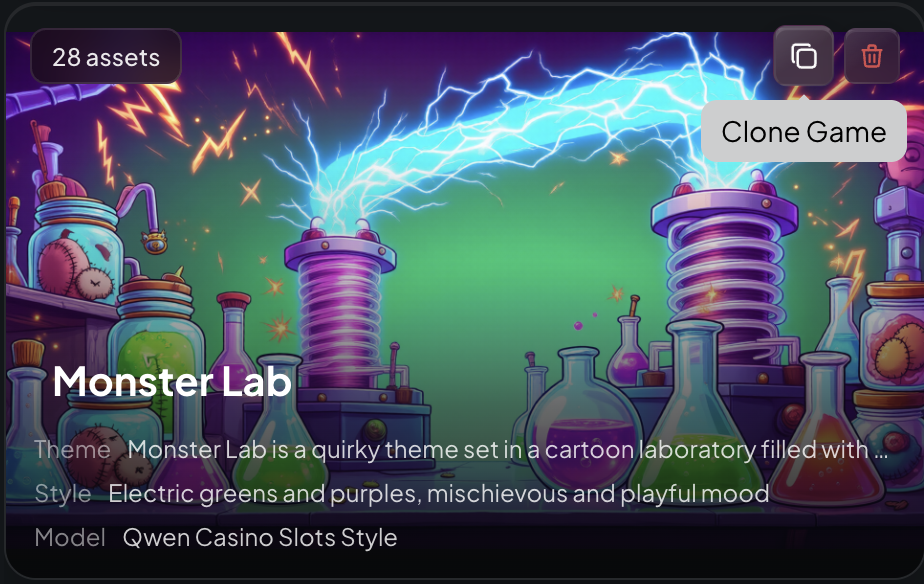
Time to do what we came here for! Hover over the game card of the game you want to clone (Monster's Lab), which you can see on the Games Dashboard. Hit the “clone” icon there! You will see a 'Edit Game Information' pop-up. Rename your game to Caravan Riches. Next, change the theme description to align with the Caravan Riches game. For example if the “Monster Lab” game theme is set in a cartoon laboratory filled with potions, bubbling beakers, stitched creatures, and lightning machines, you want to modify the theme to talk instead about desert settings, riches and gold etc.
Guess what. You can change the style of your source game, while still retaining the layout and number of symbols. Still in the 'Edit Game Information' pop-up, choose a different Style Model. Then, you probably want to provide some details in the Style Prompt section. For Caravn Riches, maybe say “Desert yellows and oranges, friendly and playful mood” in the style prompt.
Once you have entered all the new game information, be sure to activate the "Regenerate all elements” switch. This ensures that the app creates reskinned versions of EVERY slot symbol, character, frame and background - mapping them from your source game to the reskinned version. A lab becomes a desert landscape, a mad scientist becomes a desert explorer, a glass vial becomes a lamp...you get the idea! All the newly generated game assets will be reimagined to fit the new reskinned theme!
The Playable Preview is one of the coolest features of Slots Studio, and it somehow gets even cooler when reskinning a game. The game layout in your cloned/reskinned game is going to be EXACTLY the same as the one you created in your source game, just with reskinned assets! Go ahead and edit the symbols that need editing, move symbols around in the reels, reposition characters if needed, using our Live Canvas Editor functionality.
That's it! It is that simple to reskin the art for an entire Slot Game using Renderwolf's AI tools!
.png)
.png)
